


Selling a WordPress plugin means a lot of small jobs that happen every day: a new sale needs a welcome email, a failed renewal needs a nudge, a 1-star review needs a reply before it sits there for a week, and every release needs a “what’s new” note. Most plugin shops glue this together with Zapier. That works until you notice the bill grows with your sales, because Zapier charges per task, and a single sale can run four or five steps.
n8n does the same job without a per-task bill when you host it yourself. Below are six workflows worth building first if you sell plugins. I built five of them on a test n8n (version 2.48) against a real WooCommerce store and live WordPress.org feeds, and every screenshot in this post comes from those runs. Emails went to a local test inbox, not to real customers.
The six workflows at a glance
| # | Workflow | Trigger | Tested here? |
|---|---|---|---|
| 1 | New sale: welcome email with setup steps | WooCommerce webhook (signed) | Yes, real WooCommerce order |
| 2 | Failed renewal: “update your card” email | Freemius webhook (signed) | Yes, signed test event |
| 3 | Expired license: win-back offer | Freemius webhook, same workflow | Yes, signed test event |
| 4 | Low-star WordPress.org review alert | Hourly schedule + reviews RSS | Yes, live feed |
| 5 | New release: newsletter draft from the changelog | Daily schedule + WordPress.org API | Yes, live API |
| 6 | Support forum triage digest | Weekday schedule + support RSS | Yes, live feed (keyword rules, not AI) |
Two of these (1 and 2/3) start from a webhook, so n8n has to be reachable from the internet over HTTPS. The other three poll public feeds and would run anywhere. More on hosting at the end.
1. New sale: send a welcome email that heads off support tickets
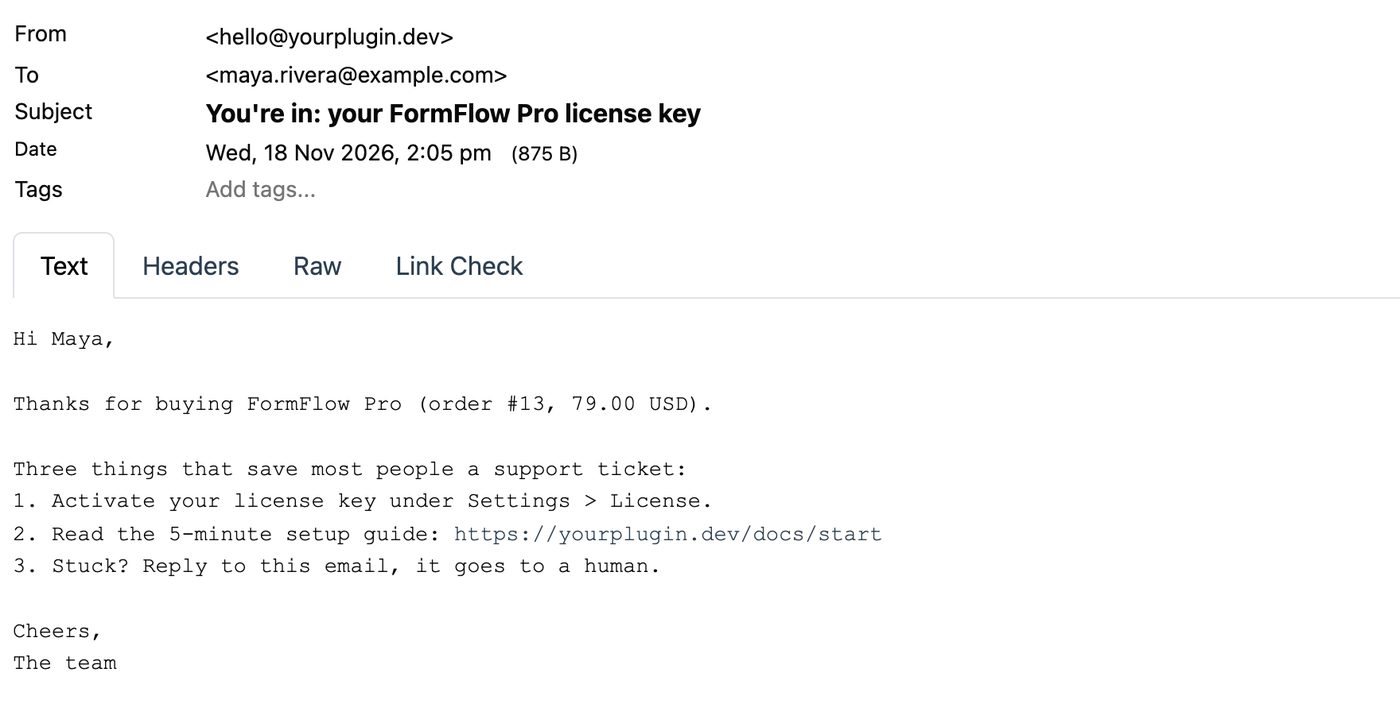
The first email after a purchase is where most “how do I activate this?” tickets are won or lost. Instead of a generic receipt, send the three things people actually get stuck on.
In WooCommerce: go to WooCommerce > Settings > Advanced > Webhooks, click Add webhook, pick the topic Order created, paste your n8n webhook URL as the delivery URL, and set a secret.
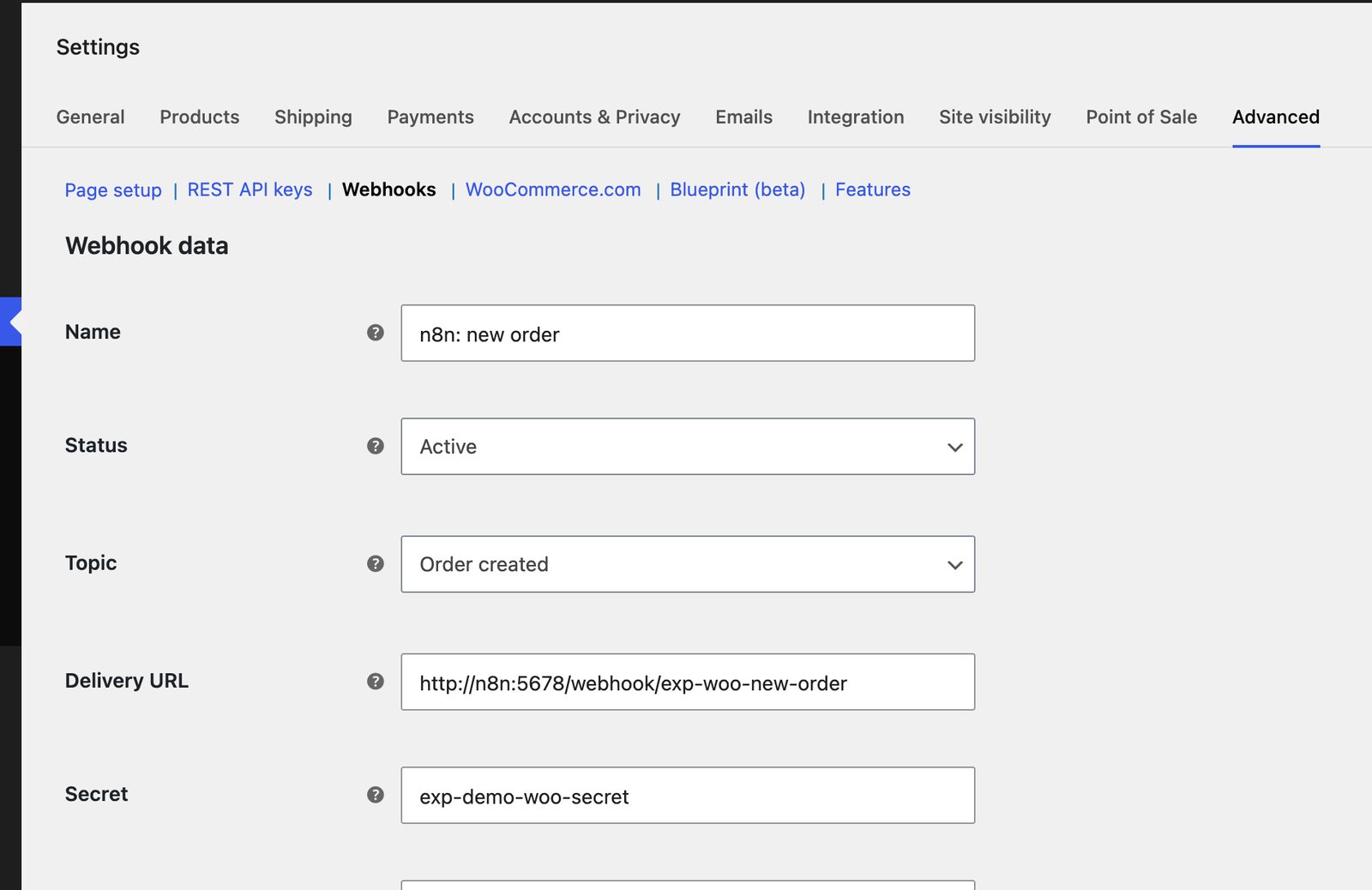
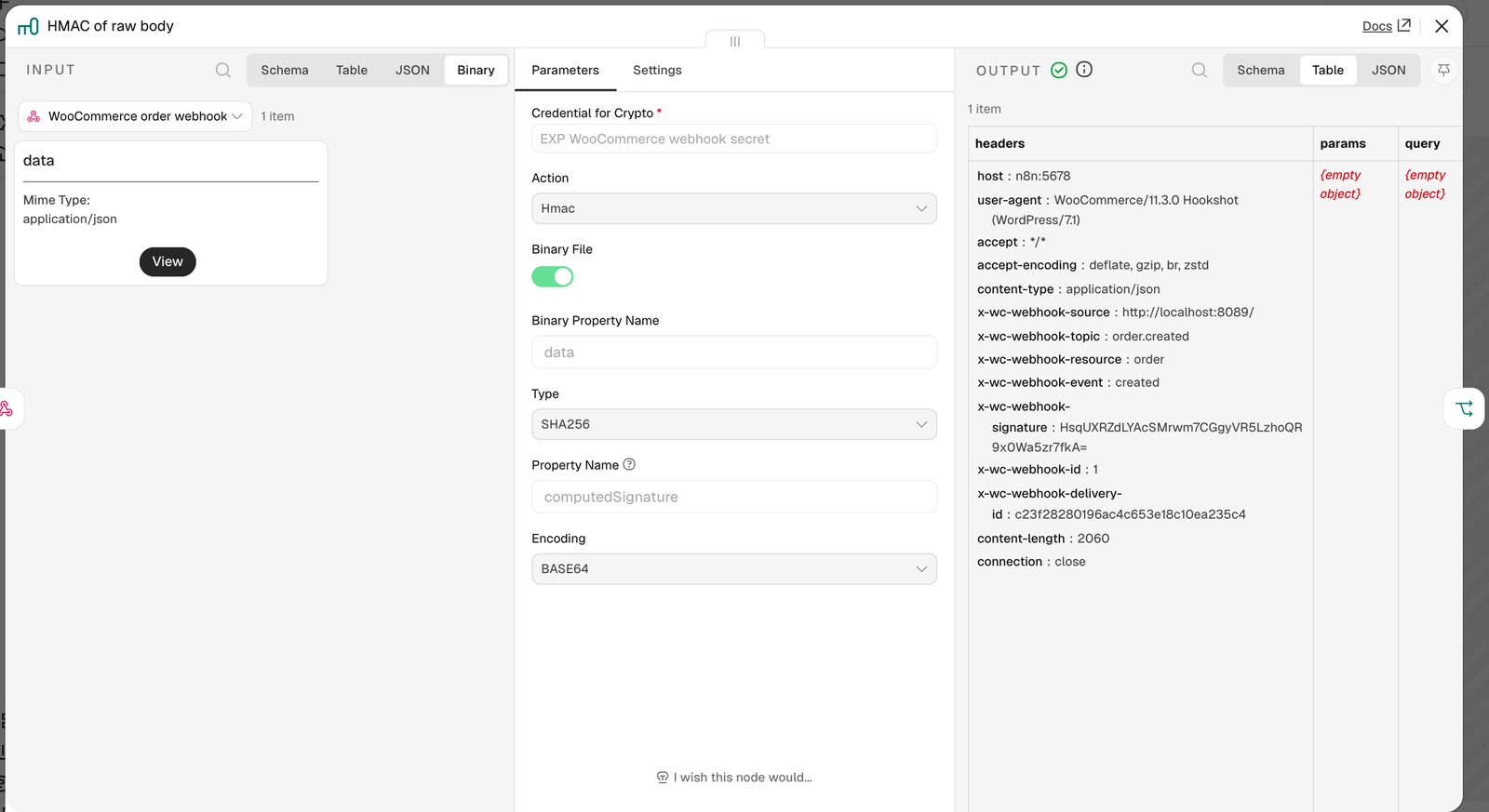
Verify the signature. Anyone who finds your webhook URL can POST to it, so check that the request really came from your store. WooCommerce signs every delivery with an X-WC-Webhook-Signature header: an HMAC-SHA256 of the raw request body, keyed with your secret, base64-encoded. The catch is “raw body”. If you rebuild the JSON in n8n and hash that, it will not match, because PHP escapes slashes differently from JavaScript.
The n8n setup that worked:
- Webhook node: method POST, and under Options turn on Raw Body. The untouched body arrives as binary data next to the parsed JSON.
- Crypto node: action Hmac, Binary File on, type SHA256, encoding BASE64. The secret lives in a Crypto credential, not in the workflow.
- IF node: does the computed value equal
{{ $json.headers['x-wc-webhook-signature'] }}? True goes on, false goes to a dead end.
After that, a Set node picks out the fields you need (billing.email, billing.first_name, the order ID, line_items[0].name, total and currency) and a Send Email node does the rest. Swap it for Gmail, your ESP, or a “create contact” call to your CRM.
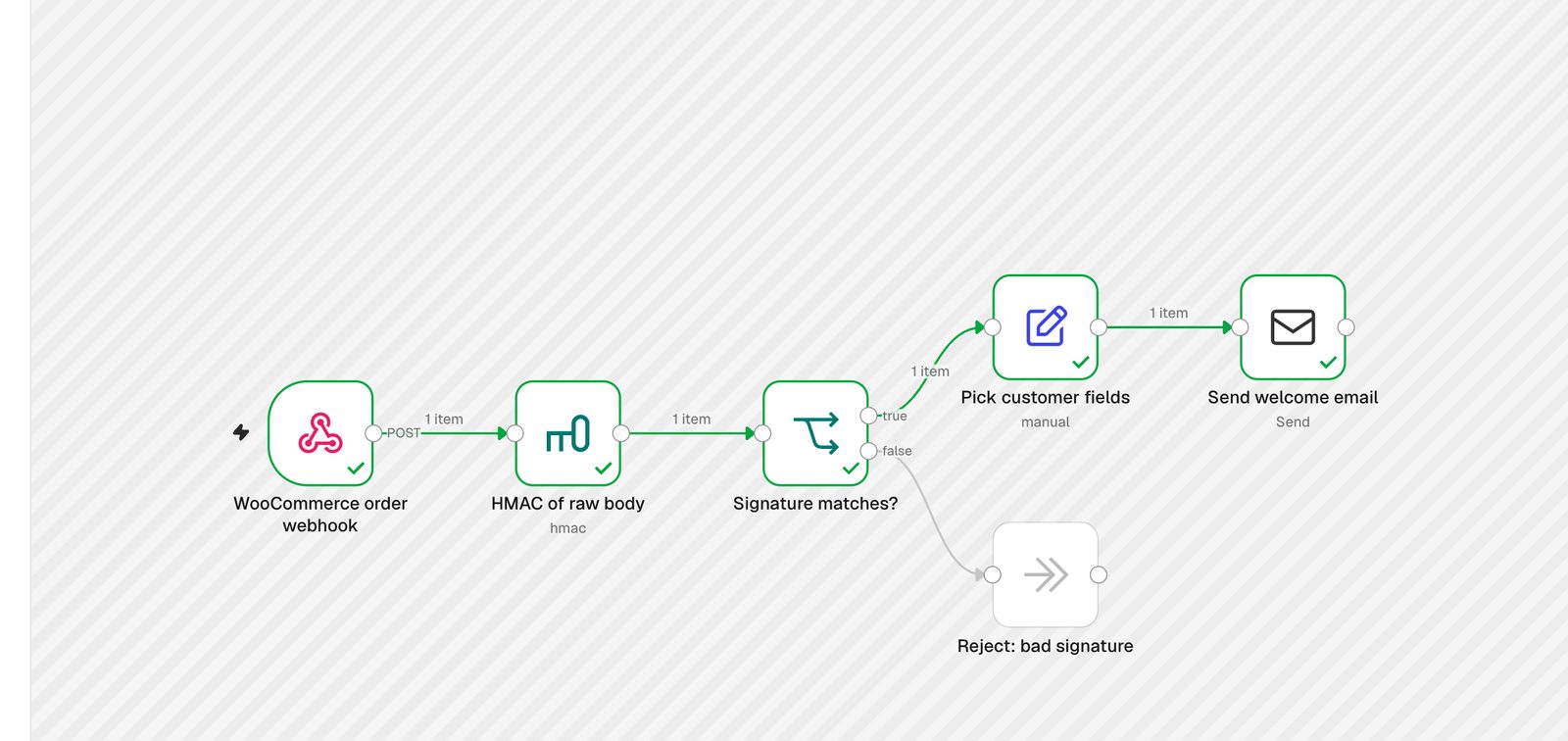
Two things tripped me up while testing. First, WooCommerce also sends a small ping to the URL: a form-encoded webhook_id with no order in it. In my run it failed the signature check and fell into the false branch, which is what you want, but it means you should not write logic that assumes every request is an order.
Second, my first delivery failed with “A valid URL was not provided.” WordPress’s safe HTTP functions only allow ports 80, 443 and 8080, and my local n8n was listening on 5678. On a real server with HTTPS on 443 you will never see this. Worth knowing too: per WooCommerce’s docs, a webhook gets disabled automatically after more than five consecutive failed deliveries, so n8n has to stay up.
On Easy Digital Downloads? As far as I can tell EDD core has no outbound webhook setting. The official route is its Zapier extension. To skip Zapier, hook edd_complete_purchase in a small snippet and POST the payment details to your n8n Webhook node yourself. The rest of this workflow stays the same.
2. Failed renewal: ask for a new card before the license lapses
Failed card payments are the quietest churn a plugin business has. The customer did not decide to leave. Their card expired. A plain email that goes out the same day, with one link to update the card, is the cheapest fix you have.
If you sell through Freemius, add a listener under Webhooks > Listeners > Add Webhook and subscribe to subscription.renewal.failed (there is also subscription.renewal.failed.last for the final attempt). Freemius signs each callout with an x-signature header. Per their docs it is an HMAC-SHA256 of the raw body with your product’s secret key, and unlike WooCommerce it is hex, not base64. Same three nodes as above, with the Crypto node’s encoding switched to HEX.
A Switch node then routes on $json.body.type. The payload uses the same schema as the Freemius API’s event object, so the customer sits at body.objects.user.email and body.objects.user.first. My test events were built from that documented schema and signed with a test key, not captured from a live Freemius account. Before you go live, open the Events view in Freemius, pick a real event and compare the fields.
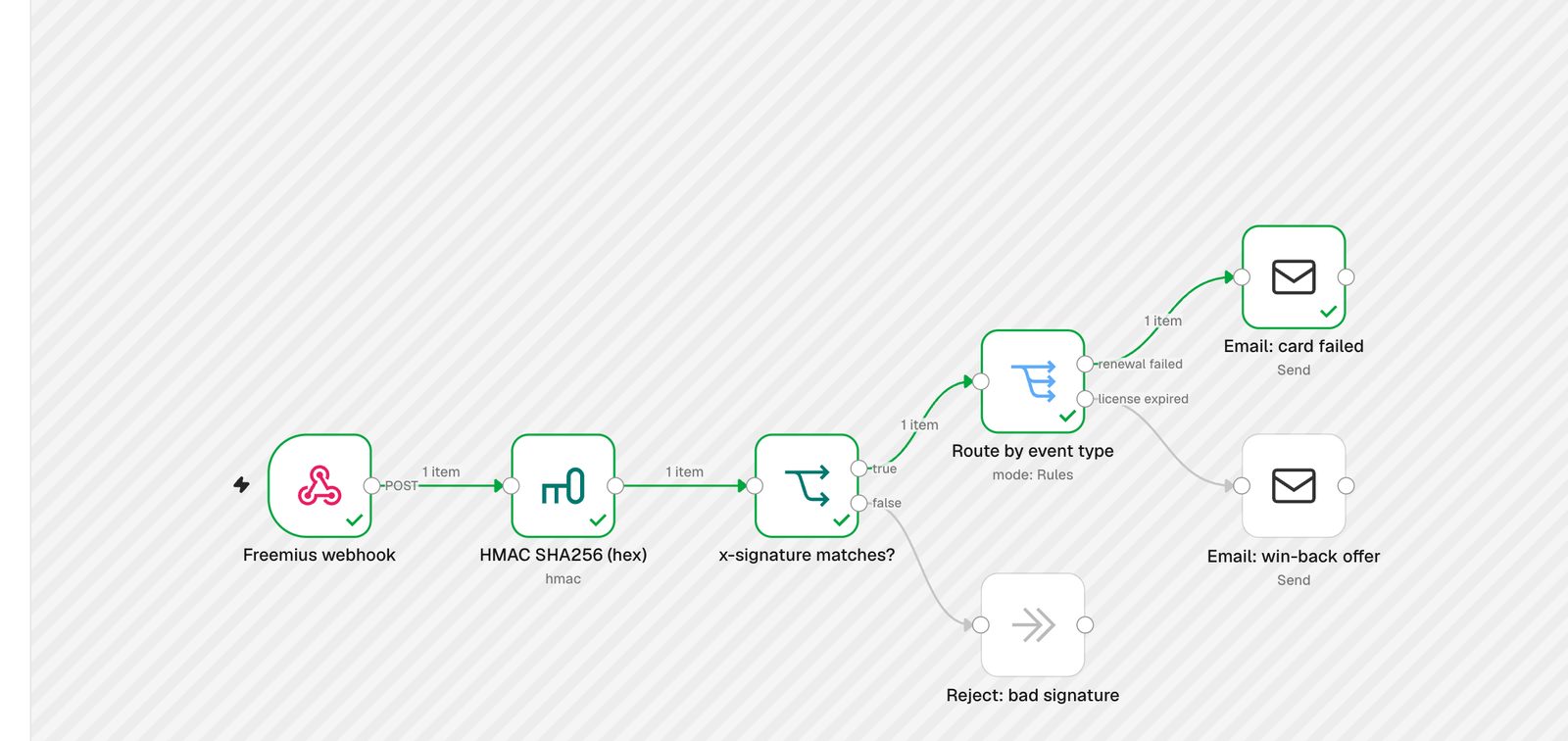
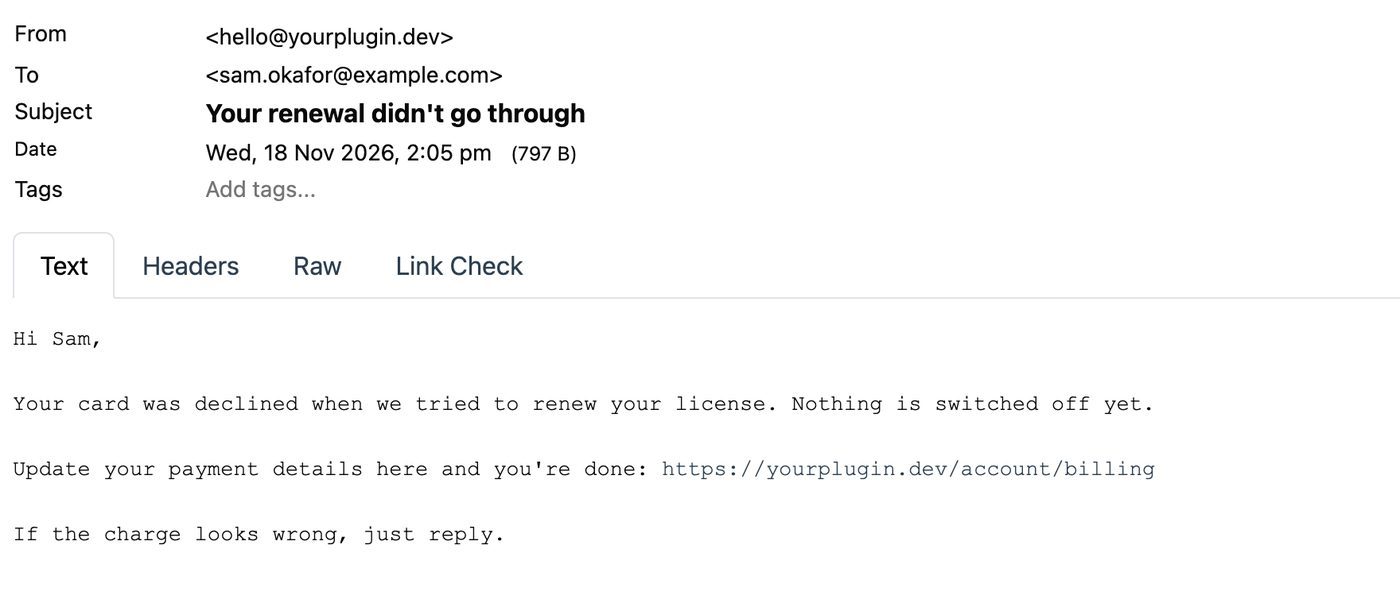
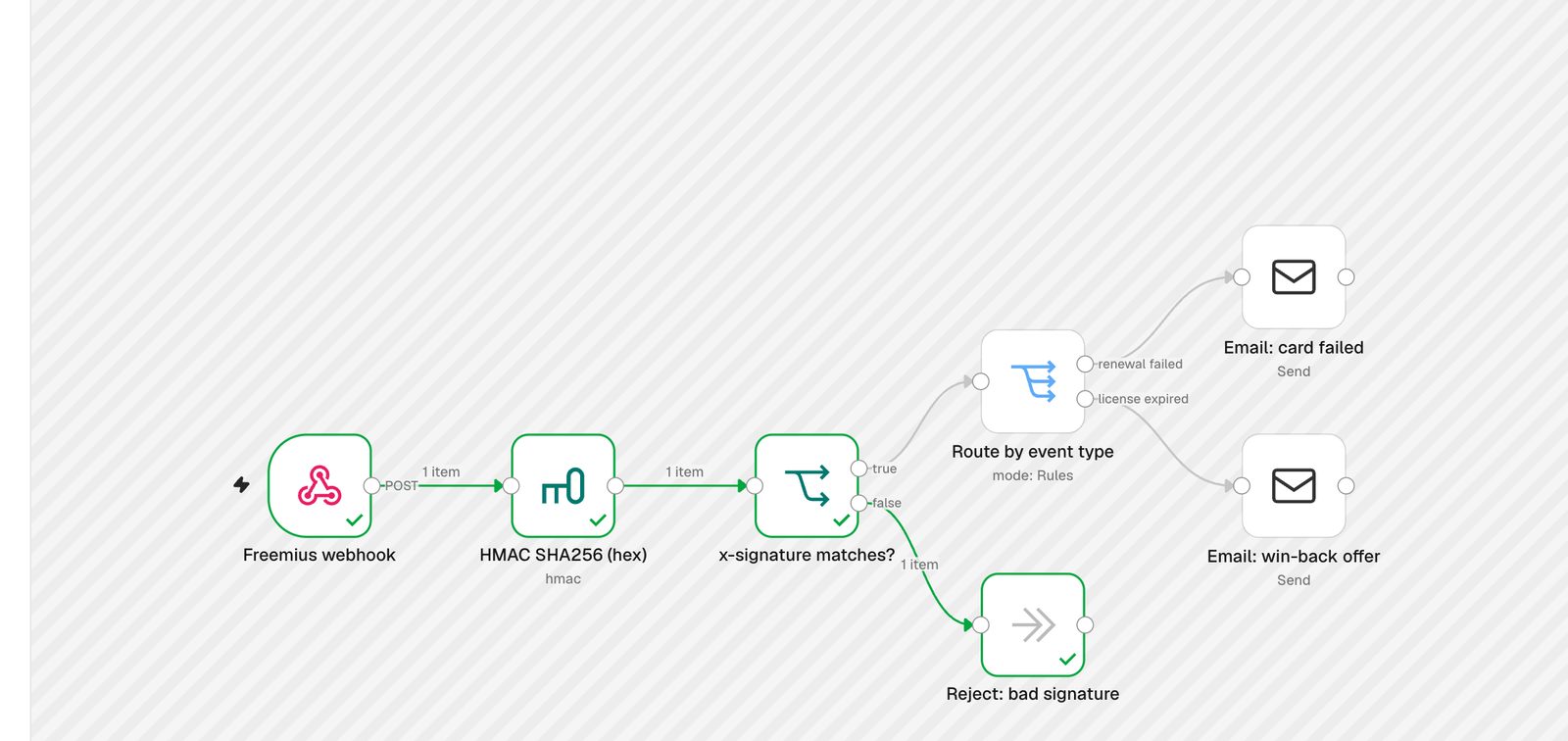
To check the signature check actually protects anything, I sent the same payload with a made-up signature. It went straight to the reject branch and no email went out:
3. Expired license: a win-back offer, same workflow
This is a second output on the same Switch node: license.expired. A license that runs out is a natural moment to offer a renewal discount, and the person still has the plugin installed. Tell them the truth (their site keeps working, updates and support have stopped) and give them a code that expires. Freemius also fires license.renewal_reminder.sent and license.expired_notice.sent when it sends its own emails, so check you are not doubling up on its built-in reminders.
4. Alert on low-star WordPress.org reviews
A fast, helpful reply is your best shot at getting a 1-star review updated, and the next person reading your reviews sees that you answer. WordPress.org will not tell you when a review lands, but every plugin has a public reviews feed:
https://wordpress.org/support/plugin/YOUR-PLUGIN-SLUG/reviews/feed/
Each item’s title ends with the rating, like Great support (5 stars). The workflow is: Schedule Trigger (hourly) > RSS Read > a Code node that pulls the number out of the title > Remove Duplicates > Filter (rating 3 or lower) > alert. The extraction is one regex:
const m = title.match(/\((\d) stars?\)\s*$/);
const rating = m ? Number(m[1]) : null;
I pointed it at a busy plugin’s real feed. The first run read 30 reviews and sent an alert for each one at 3 stars or below:

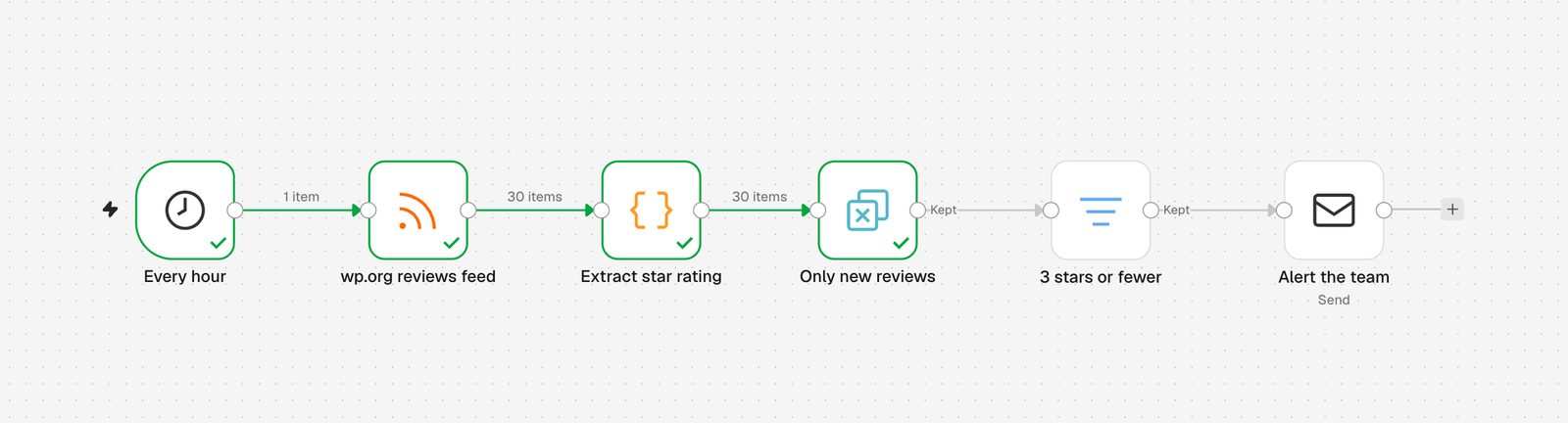
The important node is Remove Duplicates, set to “Remove Items Processed in Previous Executions” with “Value Is New” keyed on the review link. Without it you would get the same alerts every hour. The second run read the same 30 reviews and passed nothing on:
Send the alert to Slack or Discord instead of email if that is where your team lives. The node swap takes a minute.
5. New release: turn the changelog into a newsletter draft
You already wrote the changelog. The WordPress.org plugin API returns it with the current version, so n8n can draft the “what’s new” email the morning after a release:
https://api.wordpress.org/plugins/info/1.2/?action=plugin_information&request[slug]=YOUR-PLUGIN-SLUG
The response has version and sections.changelog as HTML. A Code node grabs the first <h4> block (the newest release) and turns its <li> items into plain bullet lines. Remove Duplicates keyed on version makes sure each release only produces one draft. I ran it against a live plugin and got a clean draft for the release that had shipped the day before.
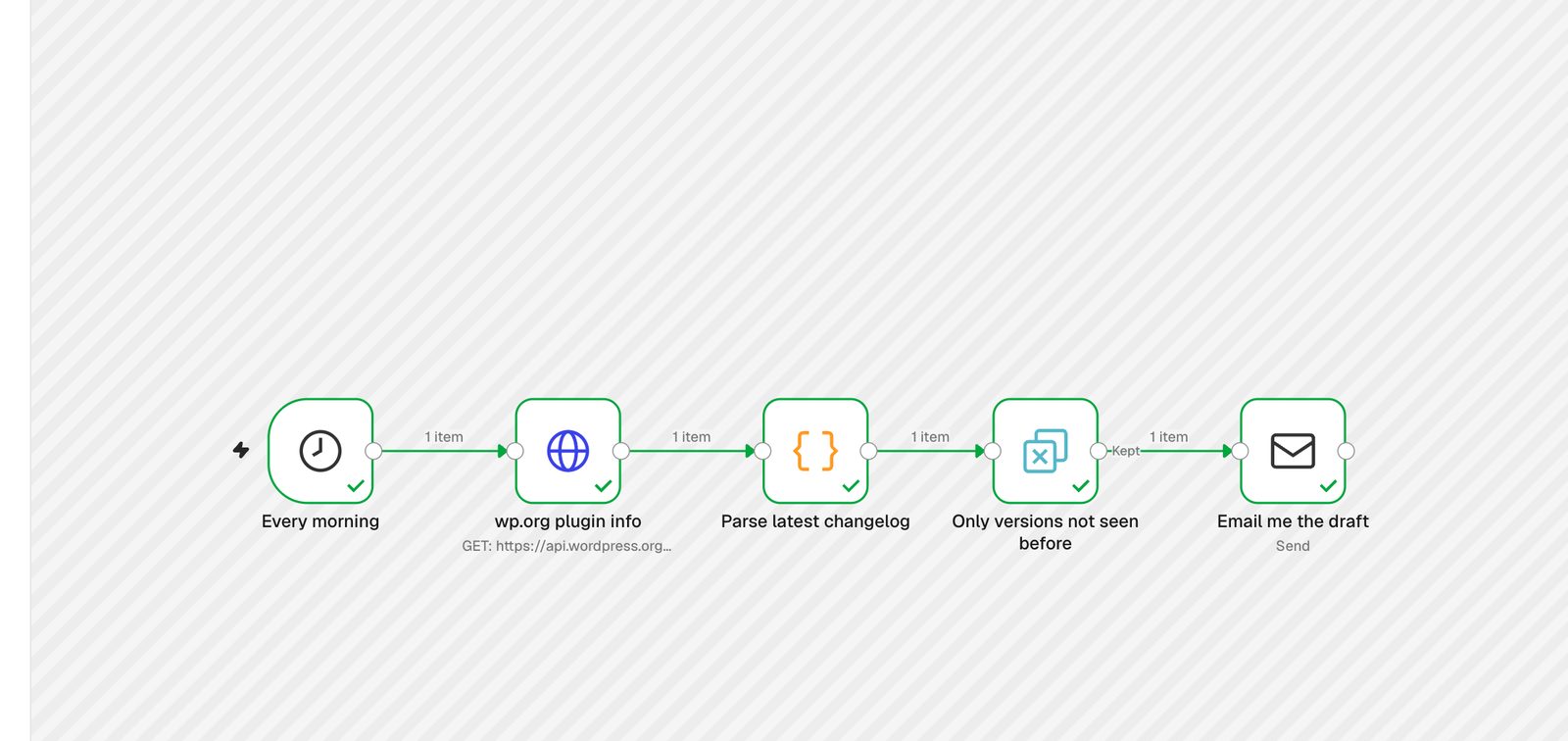
I send the draft to myself rather than to customers. A changelog written for developers (“Fixed Abilities API issues with programmatic installations”) usually needs a human pass before it goes to buyers. If you want an approval step inside n8n, the Send Email node has a “Send and Wait for Response” operation that pauses the workflow until someone approves.
6. Support forum triage digest
The free support forum is a public bug tracker whether you like it or not. A morning digest that puts likely bugs at the top beats checking the forum by hand. The forum has a feed too:
https://wordpress.org/support/plugin/YOUR-PLUGIN-SLUG/feed/
Same shape as the review alert: Schedule (weekdays at 9am) > RSS Read > Remove Duplicates > a Code node that labels each thread > a Code node that sorts bugs first and builds one digest > email.
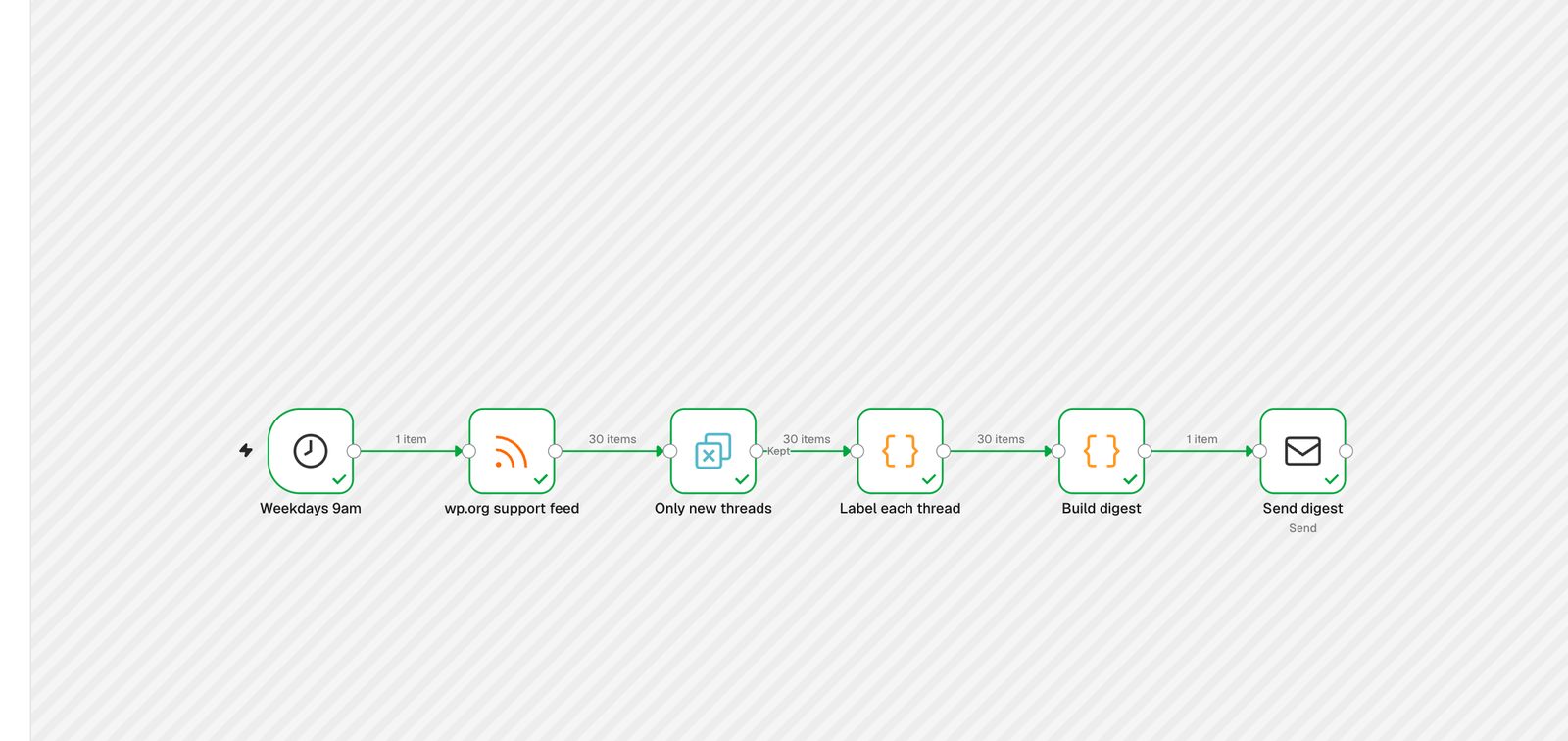
My version labels threads with simple keyword rules (error, fatal, PHP, broken, deprecated go to “bug”, refund and license go to “billing”, “how do I” goes to “how-to”). It is crude but it runs with no API key. If you want better sorting, n8n’s Text Classifier node can do the labelling with an LLM. I did not run that part here because it needs an OpenAI or Anthropic key, so I cannot vouch for its accuracy on forum threads.
Where to run n8n for this
Workflows 1 to 3 need a public HTTPS URL. WooCommerce and Freemius cannot reach an n8n running on your laptop, and if n8n tells you its webhook URL starts with localhost, here is how to fix the n8n webhook URL. Whatever you pick, it also has to stay up, because WooCommerce gives up on a webhook after a handful of failures.
Your options are n8n Cloud (per-execution plans), a VPS you set up and patch yourself, or a managed self-hosted instance. We have covered the money side in detail already: the real cost of self-hosting n8n and four ways to self-host n8n compared. For a side-by-side of providers with current prices, see the cheapest ways to host n8n.
For the six workflows above, sizing is not the hard part. They are light: a few webhooks a day and three scheduled polls. Check how much server n8n actually needs before you overbuy.
If you would rather not run the server yourself, InstaPods runs n8n as a one-click app on a real Linux server with HTTPS, a custom domain and SSH already set up. The Build plan is $7/mo flat (2 vCPU, 2 GB RAM) with no execution cap, and new accounts get $10 in credit when they add a card, which covers your first month with room to spare.
FAQ
Can n8n verify WooCommerce webhook signatures?
Yes. Turn on Raw Body in the Webhook node, compute an HMAC-SHA256 of that binary with the Crypto node (encoding base64), and compare it with the x-wc-webhook-signature header in an IF node. Hashing the parsed JSON instead of the raw body will not match.
Is the Freemius signature the same format as WooCommerce’s?
No. Both are HMAC-SHA256 over the raw body, but Freemius sends hex in x-signature and WooCommerce sends base64 in x-wc-webhook-signature. Set the Crypto node’s encoding to match.
Does Easy Digital Downloads have webhooks?
Not as a core setting, as far as I can tell. EDD’s official integration route is its Zapier extension. For n8n, POST from the edd_complete_purchase action to your n8n webhook.
Do I need n8n Cloud for this?
No. Everything here runs on self-hosted n8n with the built-in nodes: Webhook, Crypto, IF, Switch, Set, RSS Read, HTTP Request, Code, Remove Duplicates and Send Email. You only need HTTPS and a server that stays up.
How do I stop the review alert from sending the same review twice?
Use the Remove Duplicates node with “Remove Items Processed in Previous Executions” and key it on the review link. n8n remembers the links it has seen across runs.
